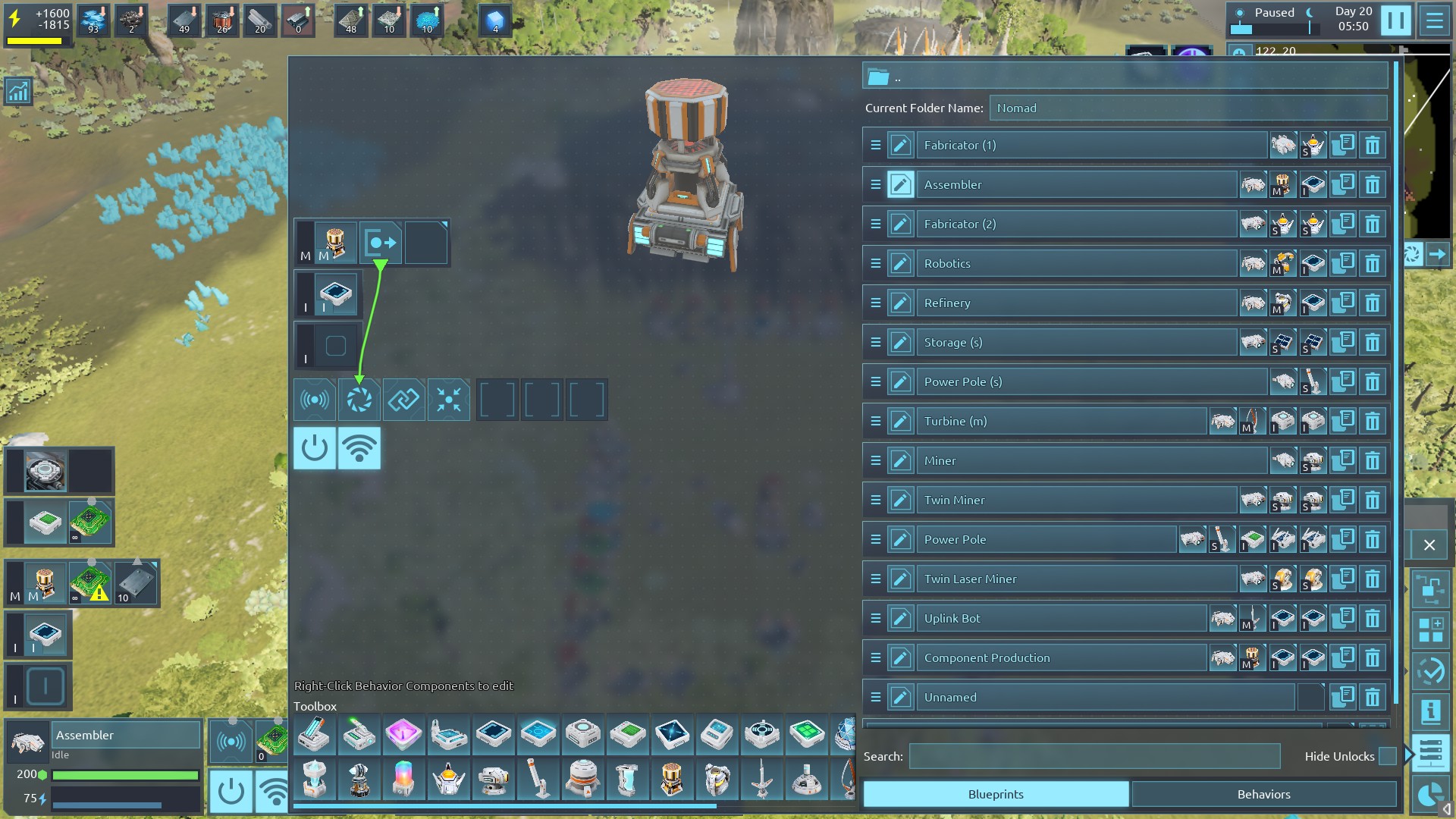
The bug itself: A "hidden" behavior controller that is added to all bots cannot be set with a default program from the library editor.
More details:
So, recent changes in experimental allow me to create a mod that adds a "hidden" behavior controller to all bots. I used the "hidden" component, because it's not remove-able and thus feels like it's attached or just a part of the bots (like the hi-grade capacitor). However, when a component is added as hidden, it's not accessible in the blueprint screen. I kind of understand why, but for behavior controller in particular, it's annoying as you can't set a default behavior program for newly made bots. I also feel that having a full list of components that you'll see in FrameView be listed in the Library editor view is also slightly less confusing.
In a recent discussion with BeatWho on the discord, there were a few bug fixes regarding "hidden" behavior components and click-ability and the behavior controller box (the one that shows up to the right of the inventory when a behavior controller is in a socket). I missed spotting this deficiency at that time.
The desired outcome would be that "hidden" components that show in FrameView would also be shown in the Library Editor with the same functionality (give or take) as what is available in FrameView. In particular, the behavior controller would need to be visible, click-able (to edit the program), and the registers would need to be shown to allow default values to be added or register links to be made.