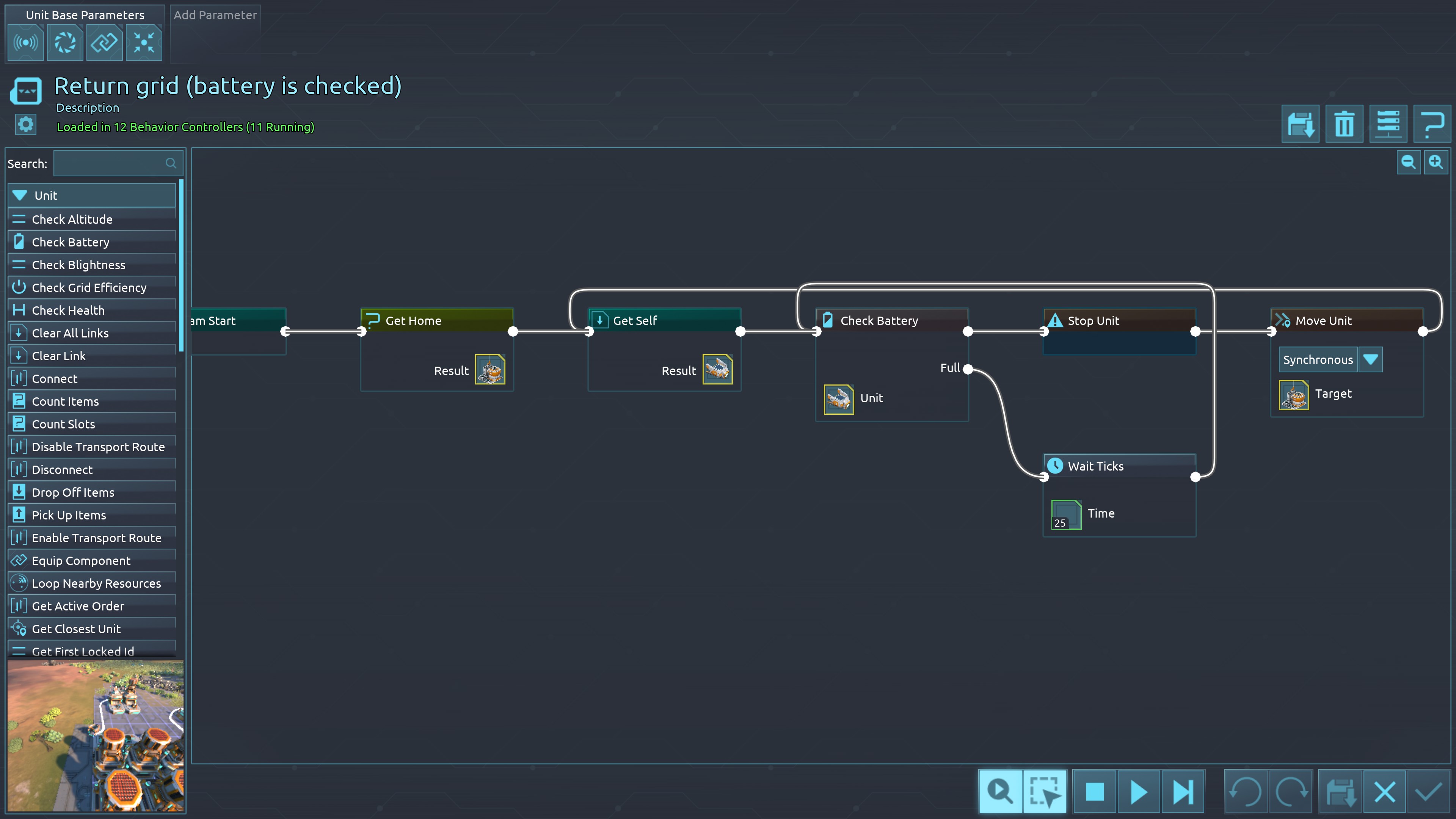
| 5751 | 🙂 | Bug | I had enough and started new save.... so i used the previous play's logic to check for battery , and if not full, aka outsite of grid, for bots to go back home... as you can see.... it goes to the top one... something that makes no sense since i have a lot of spare energy, bot is fully powered there is no energy flux, but all bots are not going on the full battery path and insted going on the top on. I removed get self, and the self from extra for the check battery, same result so i undid it. BTW, if this is not a bug an i just do NOT understand how to use this, please consider that anyone else, will make the exact same mistake. I will try o repeat, this is not something that we need to know how to make it work, this is something that should work insted of being "you did it wrong" or "you used the wrong label/chains/no clue what term". A game should be fun to play and not a "grammer nazi". Aka please combine the labels. There are to many. There is no need for similar but it's for different thing. Combine them, combine them, combine them all. Just add a droplost to change "mode". Like the moving. Drop list: Follow Unit, move to coord (see what i did? 2 different info, just different option), Tick box mo away (impliing that if it's NOT ticked = move towards)... and this also means that the units, if this is ticked, and target is enemy, will keep distance... Regadless of away or towards, the numbers (values) still to decide the disatance. So a 7: towards until you are at least 7 units closer, but this unit will NOT move away if target get's closer. And if the tick box is on, aka move away, it will aways move away to be at leaset 7 away, all the time. Aka one will be minimum and the other max, And the 4 direction are as they are, aka 7 west = 7 steps (sorry for using wrong term). Also, for the Async and sync.... Question... did you ever consider the unlock to be a feature insted of a label? As in, just like how you added the select mutiple storages (vs the 1 single before), to add so for the next chain? let me use enemies as an exemple, since i think it will help. Radar is find enemies, enemies found.... until enemies (aka result) is FOUND, the radar will go constantly (again, just think of unlock), like a loop until target is not found, so that is the trigger. Until not found, it will loop the scanning for enemies (result). So, do you start to get where i am getting? as the radar keeps looping itself, separetly the move to exist, aka keep minimum distance from enemies. And also another move, keep towars enemies. Like this... omg... i just realise... why am i doing the same mistake i try to suggest to correct? please just add another drop list, min Max, i hope it's self explained and the ideea is that just 1 single move. Aka the radar can branch into move, but canot have more then 1 move to avoid confusion, errors, bugs, and more, this is why having a min max is actually a better solution. Aka put restriction of types via adding range. And then, the 3rd, is the turrets themself. And as a 4th, is conditions like battery, health, shield, whatever it might be. Ideea is that again, just 1. Because if we can check all at the same time then really, what is the point of the programing? like this, we can chain it, check health, check battery, check shied (if applicable) and loop over. After all no battery = no attack. Ideea is to have branches, but just 1 per link (but essentially infinite new links). And again, check health, battery, shied, inventory, durability, frame, whatever else, as it's own label but via drop box and tick boxes. Seriosly, use the free AI, heck, use all the AI that companies allow to use for free, and just copy paste the text and have them compose a "solution" until they found one that actually fits. Just rember, the ideea is to reduce "guessing" and "you need to know and use EXACTLY". Aka integrate mutiple thing. Like the links, you just add a tick box or drop box clear or (create) links, then the boxes where...you know how? you select the componend, like the radar, and in this box, the yes the link box, in this box, you selected the radar, and you see the actual radar, aka with it's image, the 3 filters, and the resoult And then for the to, once again, you select, as if you where MANUALLY creating a link on a bot, WITHOUT programing. Aka recreate the non program in the programing, this will futher avoid confusion and the need to know how to. And again, one at a time, the link to new label, please keep them. No need to go that far with reworking it. But anything that is an opposite or in between or mix, should work. And we just select from the drop box. Look up Ikea, why they are succesfull, as in, it's because they give less options = people make easy decision. Because one of the reason why i restarted the game is because i realised using LINK is way, waaaaayyy more simple (ah sorry also the radar) to automate the bots then using just radar and get location, get self, get whatever go wherever. The links are actually extremly power and easy to use. So yeah, new game to get rid of all the program mess i did because yes, i will not spend hours cleaning it up when i can just start fresh. Same with get id or item or whatever. You select the drop box, and there you can manually select each (again, it's just as if you are doing it manually, visually and everything, including the dragging, but this will be done automatically, no need to enter slot number and other stuff that needs testing if it was written correctly), and if you hold ctrl you can select mutiple or something ,and if you drag it to another icon that you can see clearly, it will select all items. BTW, please condider adding a small lock icon for anything with inventory for instant lock, unlock. Heck, you can even use the mouse to right and left to lock or unlock.... why? imagen you have some items and some items you don't have. Imagen you hold shift or alt or whatever when pressing the lock, it will lock just the item that you have (VS all slots without holding). And reverse, you hold that button, and click the other mouse button when pressing said icon and it will unlock just slots that contain items. Meaning this will be extremly handy if you want a bot or building to empty it's inventory without getting new items. So ideea is that 1 (or maybe separate lock unlock buttons? if they are small it should be ok, no?) and combined via ctrl, shift, or/and alt to have different beheviour when pressed. And of course, this stuff are simple tick boxes on the labels. You select the drop box for lock or unlock. Second drop box will have empty slots, slots with items, whatever fix not fixed. And what to do next. The Logistic label is really one of the best exemple because as you can see it's extremly hard for me to put things in words. because i have one issue: i honestly do not know how it is possible to program all that i wrote. Issue 2: i honestly do not know how to suggest stuff that might at least give ideeas how to rework this, because sadly, if this game goes into 1.0 with the current labels and other elements, programing will be loved by few, and most will never touch it aside from loading some blueprints that others posted or similar. |  | 2025-11-08 01:24:57 |